
Friction LimitAdd to Shopify

Discount abuse prevention for Shopify

Protect your margin from repeat discount abuse.

See how often shoppers reuse your offers in Shadow Mode. When you’re ready, switch to Blocking Mode to reject recognized repeats before an order is placed. Shoppers can still check out.

Available on the Shopify App Store · Plans from $19 USD/month

Shadow ModeIllustrative example
First orderWELCOME20 applied
Offer used
Repeat order · New accountWELCOME20 applied again
Tagged for review
Order placed
$20Repeat discount observed

A new account can claim another welcome discount.

You set aside part of your margin to win a new customer. When a returning shopper claims that offer again through another account, your store pays the incentive twice.

Worked example · 20% off a $100 basket
  1. First orderWELCOME20 takes $20 off
  2. Return visitNew account claims WELCOME20
  3. Repeat order goes throughAnother $20 discount

See where discounts are being reused. Decide when to enforce your rules.

Shadow Mode

See what’s happening on your store.

Start in Shadow Mode. Shoppers use eligible discounts and check out as usual while Friction Limit measures observed repeat use and estimates the discount value involved.

With order tagging enabled, qualifying completed orders get a review tag in Shopify. Your team decides whether to fulfill, hold, cancel, or refund each order.

Add to Shopify Choose Shadow Mode after installation.
Illustrative Shopify review
Observed repeat uses1
Estimated repeat discount value$20
Order #1042 Placed
WELCOME20 applied$80 subtotal

Friction – Review discount use

Illustrative subtotal before shipping and taxes.
Blocking Mode

Reject the repeat discount at checkout.

When Friction Limit recognizes repeat use and Shopify permits rejection, the shopper sees your message before placing the order. They can continue without the rejected code or use another discount they qualify for.

WELCOME20 has already been used.$100 before shipping and taxes · Continue to shipping

You can start in Shadow Mode and switch to Blocking Mode in Feature Controls. The setting applies across the store’s protected offers.

Illustrative checkout · Northstar Goods
Read the checkout transcript

The shopper enters WELCOME20 and selects Apply. The checkout displays “WELCOME20 has already been used.” The subtotal is $100 before shipping and taxes. Continue to shipping remains available.

Resolve the discount before the order is placed.

When you spot repeat use during order review, the shopper has already bought at the discounted price. Blocking Mode gives the shopper a clear answer while they’re still checking out and lets them decide what to do next.

Review after the order

  1. The shopper places the order with WELCOME20.
  2. Your team reviews it and chooses whether to fulfill, cancel, or refund.

Reversing the order can mean explaining the decision and asking the shopper to check out again.

Enforce during checkout

  1. The shopper applies WELCOME20. A recognized repeat is rejected with your message if Shopify permits it.
  2. The shopper can continue at the updated total or enter another eligible code.

Your team can enforce the rule in the same checkout. Other codes still follow their eligibility rules, including shared campaign limits.

After reviewing what Shadow Mode shows, use Blocking Mode when you’re ready for ongoing enforcement.

Start with the discounts that matter most.

  1. Install and connect your store

    Add Friction Limit, approve a plan or available trial, and enable the app embed in your Shopify theme. New installs start in Blocking Mode. To observe first, save Shadow Mode in Feature Controls before activating your first offer rule.

  2. Choose offers and set the reuse window

    Protect one code or give 2–10 existing codes a shared allowance.

    Standalone
    WELCOME20
    Shared allowance
    HELLO20 + FIRST20

    Choose 1–3,650 days before the offer is eligible again, or set an indefinite rule.

  3. Review results and decide when to block

    Enable checkout KPI tracking when prompted. Review observed repeats, estimated discount value, and tagged orders. Switch to Blocking Mode in Feature Controls when you’re ready to enforce.

Friction Limit uses available browser identity, Shopify customer history, and saved address matches to check whether a protected offer was used before. Recognition depends on the evidence available. See guest and shared-household cases.

See which offers are being reused.

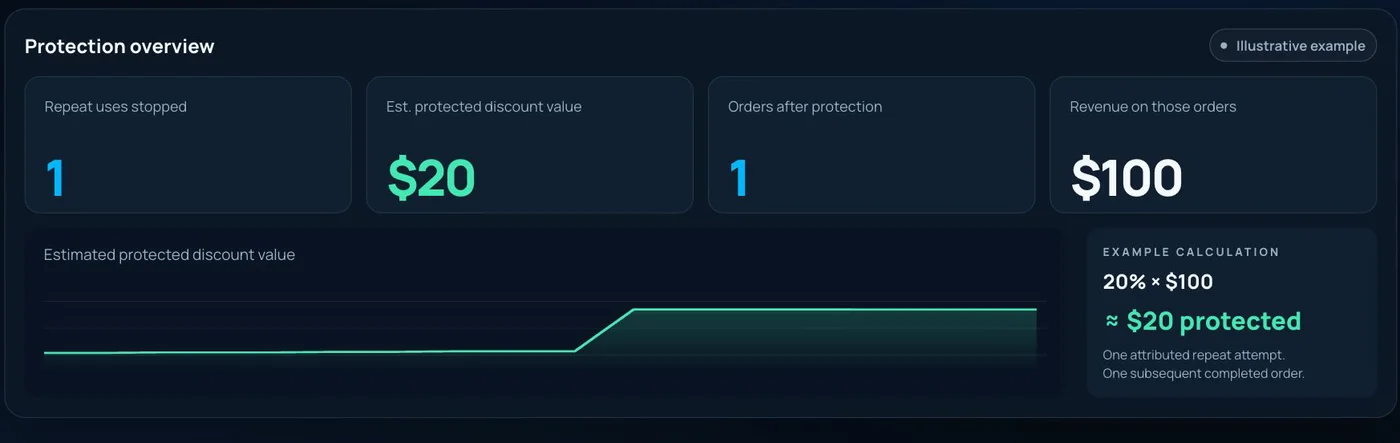
Illustrative Blocking Mode dashboard showing one repeat stopped, $20 estimated protected discount value, one order after protection, and $100 revenue on that order.
Illustrative Blocking Mode report. Order revenue is shown separately from estimated protected discount value.

Shadow Mode

Observed repeat use and the estimated discount value involved.

Blocking Mode

Attributed stops, estimated protected discount value, and orders that completed after protection.

Offer breakdown

Review performance by individual code and campaign family.

Simple monthly pricing. Start with your store’s order volume.

Choose a plan based on non-test orders in the last 30 days. These ranges are recommendations. Shopify handles approval for all three fixed monthly plans.

Basic

$19 USD / month

Up to 2,000 orders in the last 30 days

Growth

$39 USD / month

2,001–5,000 orders in the last 30 days

Scale

$59 USD / month

More than 5,000 orders in the last 30 days

  • Protected codes and campaign families
  • Shadow and Blocking modes
  • Reporting
  • No usage charges

Try Basic protection free for 7 days through Shopify. Choose a paid plan to continue after the trial.

Questions about Friction Limit

Will Shadow Mode change my checkout?

Shopify’s existing discount rules and checkout flow continue as usual while Friction Limit observes repeat use. Qualifying completed orders can be tagged for review in Shopify.

Can a shopper still buy after a discount is rejected?

Yes. When Blocking Mode rejects a protected code, the shopper sees the updated total before placing the order. They can continue without that code or enter another discount they qualify for. Shopify’s discount code FAQ

Can I protect more than one code for the same promotion?

Yes. Group 2–10 existing codes into a campaign family with one shared allowance. Choose a reuse window from 1 to 3,650 days or keep the restriction indefinite while the rule is active.

What happens if a repeat can’t be established?

Shopify’s normal eligibility rules apply. Guest and some accelerated checkouts may provide fewer signals. Address details from a completed guest order can inform future protection where Shopify access and store settings permit. Shared devices or household addresses may share eligibility.

Can I change modes later?

Yes. Choose Shadow Mode or Blocking Mode in Feature Controls. The setting applies to protected offers across the store.

Guides for protecting Shopify discounts

The Friction blog covers repeat promo use, welcome-offer rules, and campaign families.

Read the blog

See what repeat discount use looks like on your store.

Install Friction Limit, start in Shadow Mode, and see which offers shoppers try to reuse. Use what you learn to decide when to turn on blocking.

Add to Shopify